Using Multiple Templates on a Site
WebHaste uses a main site template to render all the pages in a site. However, there may be situations where you need to have homepage, secondary or per-section templates.
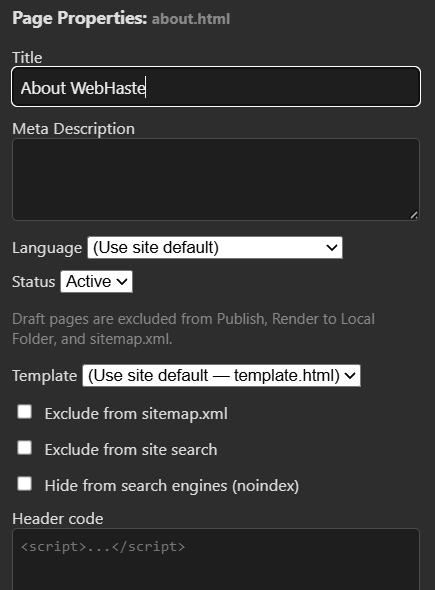
WebHaste gives you the ability to create several template files (just store them in the .webhaste/templates folder) and set which template to use on a per-page basis. By default, pages are linked to the main template defined in the site settings. However this can be overridden.
In the file view, click the settings cog for your page, and then pick which template to use:
Here are some scenarios where a site might use multiple templates.
A Highly-Designed Homepage
You may have a site that requires a heavily customized homepage, with elements that don't exist on other pages. In some cases, you can satisify this need with custom blocks, but that's not always the best approach.
In this scenario, you would have two templates, like:
- homepage.html
- template.html (default)
A blog or documentation section
Your site may have a section that is somewhat self-contained, like a blog. In this case, you might want a slightly different layout with a side menu listing recent articles.
You can accomplish this by creating a blog template, with a side column and its own navigation menu. Then the pages in the blog section would be set to this special template.
For example, you would have two templates:
- template.html (default)
- blog.html
Campaign landing pages
You may have ads or social campaigns that need specialized landing pages. These pages are typically highly designed and have their own CTA actions, coupon codes, forms and tracking pixels.
In this scenario, you might have several templates, like:
- template.html (default)
- facebook-landing.html
- googleads-landing.html
- tiktok-landing.html
Multiple Locations
Your site may be for an organization with multiple locations or departments. These "sub-site" templates might have slightly different navigation, contact information or footers.
In this scenario, you might have several templates, like:
- template.html (default)
- template-hr.html
- template-operations.html
- template-sales.html
 Topics